Wednesday, November 24, 2010

Who Has Asked the Cloud? With apologies to W. O. Mitchell

The following is from a weekly column I write, called Curriculum Connections, in the OCDSB Business & Learning Technologies e-Newsletter.

The Internet is a busy place and it can be overwhelming to try to sort through the myriad of educational choices for our students. The Business and Learning Technologies department of OCDSB has 11 skilled and experienced Consultants, Coaches and Learning Application Specialists, who are tasked specifically with Educational Technology and how it supports learning goals. We try to navigate through the highways and back alleys of the cloud, searching for easy to use, supportable equipment and software that align with our Ontario Curriculum needs. This all takes time, and that can translate into wait-times for answers to staff's questions.

Question: What can you do to speed up your planning, and use the technology in your lessons?
Answer: Ask the cloud!

Courtesy of http://www.flickr.com/people/fontplaydotcom/


Most developers understand very well that a satisfied customer is a “using” customer. To this end, they provide online (or cloud) forums, FAQ’s (Frequently Asked Questions), PLC groups, lesson ideas and Video Tutorials.

For example, Frames 4, an Ontario Ministry licensed animation application, includes a complete online community, where support is readily available from colleagues in the classroom.

Tuesday, November 16, 2010

Storytelling and Story Writing

The following is from a weekly column I write, called Curriculum Connections, in the OCDSB Business & Learning Technologies e-Newsletter.
 
The Literacy and Numeracy Secretariat has released its “Literacy and Numeracy Strategy” Fall 2010 Resource Package at http://www.edu.gov.on.ca/eng/literacynumeracy/publications/fall.html

Rich with research and  practice-related resources, strategies and curriculum connections, it provides cohesive, classroom friendly suggestions and ideas, broken into quick, manageable articles.

Storytelling and Story Writing “Using a Different Kind of Pencil”; Dr. Terry A. Campbell and Michelle Hlusek. (Oct 2009) at http://www.edu.gov.on.ca/eng/literacynumeracy/inspire/research/WW_Storytelling.pdf
asks “How can teachers make writing fun and motivating, so that even reluctant writers want to write?”. It is a compelling read.

Using oral story-telling, to retell a story, with a change to the setting or plot, can scaffold reluctant and hesitant writers. Strategies such as storyboard creation and visual reenactments give students confidence. “Once they had a story in oral and visual form, they felt like authors, even before pencil was put to paper.” (Campbell & Hlusek, 2009)

Many graphic organizers and storyboards are available online, either for cloud-use, or for teacher download.

Check out http://ocdsbdigitalstorytelling.wikispaces.com/Online+graphic+organizers for some examples. This is a wiki so collaboration is encouraged. If you have further resources or comments, please “Join This Wiki”

Thursday, November 11, 2010

Ontario PLN - The Power of Us

We arrived last night for the Educational Computing Organization of Ontario's annual conference eager to engage in conversations and collaborations with many dedicated educational professionals who contribute to what we refer to as the Ontario PLN. Quickly we shape-shifted into the collective, no doubt in response to conference co-chairs @BrendaSherry and @PeterSkillen's call of "Where's the Flock?" As we congregated in the hotel lobby after settling in, it occurred to me that we did indeed exhibit flock-like behaviour. People stopped by on their way up to their rooms, we re-grouped and amoeba'd our chairs as we adapted to the ebb and flow, small groups broke off and flew upstairs as the evening progressed and we all chattered, and tweeped and of course, laughed and guffawed, as we met up with old and treasured friends and met new ones face to face.

We reminisced, as old friends do, about the inception of the Ontario PLN, back in the day when we were fledglings just trying out our twings and brought down Twitter with our first #edchat. The fact that this happened in 2008 only heightens our understanding of the dizzying speed of new communications, the power of networking and the pressing need to find colleagues, in Ontario and beyond, who share our passion for the learner in the 21st Century. We know we have a digital key which will unlock so much unrealized knowledge, ideas and passions in our students, and we ourselves are passionate in helping other educators understand the powerful and accessible tools that can facilitate this.

I'll be sharing my story of the Grade 5 boy who quietly followed me around the computer lab I was working in last week, helping to plug in mice and run applications, and who seemingly did not engage in the task at hand. When I checked his Bitstrips file that night, I was amazed to find that he had completed many comics that demonstrated deep understandings, higher order creativity in complex expressions of meaning and a wry sense of humour. Not sure I would have got that if I had asked him to write a paragraph.

While The Flock was sharing our recent experiences, and excitement for the upcoming discussions, our great friend and colleague, and everybody's favourite redhead @ColinJagoe told us about a conversation he had with Jeff Brown (@techguy1717) regarding the Premier's Awards for Teaching Excellence nominations. (I have to admit that Premier @DaltonMcGuinty's authentic and homey tweets about his weekend Honey-Do list have given him an honourary roost on our Ontario PLN's wire)

In the tradition of Time magazine's Person of the Year - You , they suggest the Premier's Award for Teaching Excellence goes to, well, US! Yes that rag-tag group of Ontario Educators who, although spread out geographically, stay in touch digitally to collaborate, and support, and demonstrate above all else, that they are caring and dedicated professional educators.

So to @colinjagoe and Jeff Brown@techguy1717 , I second that emotion.

Tuesday, November 9, 2010

The Digital Writing Process – Using Computer Time Effectively

The following is from a weekly column I write, called Curriculum Connections, in the OCDSB Business & Learning Technologies e-Newsletter.


We have been using a comic generation application (www.Bitstrips.com) in a Grade 5/6 class since September as a tool for expressions of understanding of character education traits, bullying and its impact, and plot analysis of a story.

A discussion of whether we should move on to a new application with the students ended with our questioning what instructional purposes would that serve. The students are adept with the tool, and are ready to get on task as soon as they login. There certainly is a new tool out there that might work in a slightly different way, or bring in more media, but why fix it if it isn’t broken? If the activity is rich and engaging, and creates opportunity for critical thinking and ease of communication, then a single, flexible tool can be adapted for many desired outcomes.

But successful, mindful use of the tool when students are on a computer is part of a planned, instructional process. What is the desired result of the activity? This was determined, and supports and instruction were done in class, long before the digital writing commenced. Knowing what was acceptable digital evidence was key to the planning of the units. Did the students demonstrate an awareness of bullying, and articulate how they might feel, which was the task, or was it just a series of panels showing what bullying might look like, in the case of most girls, social, and for the boys, physical?

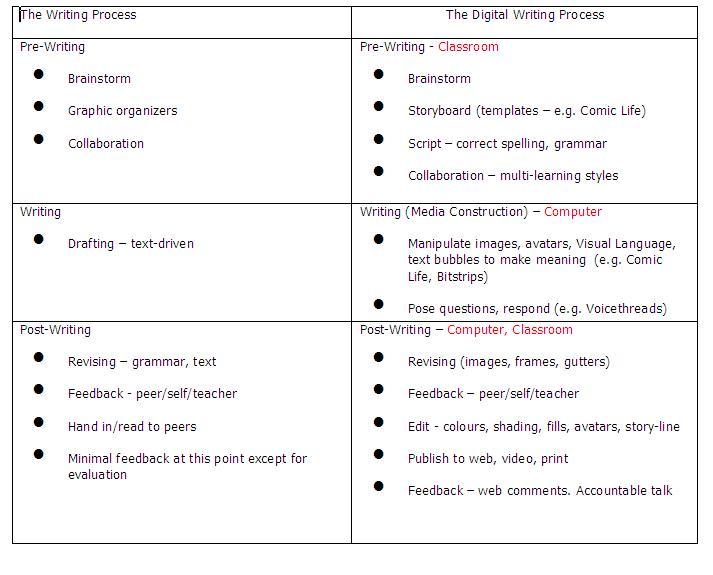
To help with planning for computer use, please refer to the following chart:
While some of the elements of Digital Writing can be replicated using paper and pencil, (e.g. a comic strip can be hand-drawn), the power of the digital writing process is universal accessibility for multiple learning styles, and the ability to communicate complex understandings in differentiated ways.

Wednesday, October 27, 2010

Accountable Talk/Peer Feedback

The following is from a weekly column I write in the OCDSB Business & Learning Technologies e-Newsletter called Curriculum Connections.

Using Bitstrips as a tool for a discussion of Character Ed traits, it was quickly noticed that the students were demonstrating acceptance, appreciation and respect in their cooperative approach to learning and their positive comments to peers on their finished stories. Great!

Looking more deeply, and reflectively, at the comments, we were soon discussing what constituted accountable talk and effective peer feedback. Using the following graphic as a starting point, students could be asked questions such as “How could your comment help the author develop his or her meaning?” or “What could you ask that would help the author understand how this connects to a safe and caring learning environment?”.

As further peer comments were analyzed it was noted that chronology played a part in the content, as is often the case when a blog is posted and the “long tail” of comments occurs. Often people comment, not on the original post, but on other peoples’ comments.

Many teachers have asked for a recommendation for a safe blogging site for their classes. Bitstrips has potential for a rich, interactive environment. Teachers can post a discussion question or graphic, using the Visual Language of the medium, which engages multiple learning styles, and students could comment using directed Accountable Talk. The teacher can easily jump in for “just in time” responses that ask for deeper connections, respectful disagreement with mindful rationale, or extensions of opinion. This activity could be done in a lab (partnering would elicit collaborative thought), or in a small group around a classroom computer.

Any comments?

Wednesday, October 20, 2010

Bubbles and Gutters

The following is from a weekly column I write in the OCDSB Business & Learning Technologies e-Newsletter called Curriculum Connections.

This week I address:
Media Literacy 3.3 Conventions and Techniques; Reading 2. Understanding Form and Style

The comic and graphic novel genres have specific codes and conventions, just as text-based language does. Exclamation, question, and declaration (spoken, whispered) are clearly identified through the use of speech bubbles and formats that are as widely known as quotation, exclamation and question marks, and periods. Bitstrips defines these bubbles clearly for the student. A number of shared activities could be designed, such as create a comic with different speech bubbles and have an elbow partner fill in the text, or match different texts with the appropriate bubble.


Another important feature of panel writing is the space between the panels, called the gutter. The gutter can indicate the passage of time and indeed graphic novelists such as Scott McCloud will be very deliberate when deciding how large the space will be.

BUT WAIT THERE'S MORE! Reading 1.5 Making Inferences/Interpreting Texts
Another use of the gutters is for making inferences or predicting. Students can infer what has taken place to move the story from panel to panel, predict what will happen in the next panel or fill in missing panels. Working in small groups, students could storyboard a strip and then leave out a panel for other students to fill in.

Comic Life allows the ultimate manipulation of gutters.


For a detailed description of the codes and conventions of the comic genre, plus over 40 activities, check out “In Graphic Detail” by David Booth and Kathleen Lundy.


Tuesday, October 12, 2010

Copyright/Copyleft

The following is from a weekly column I write in the OCDSB Business & Learning Technologies e-Newsletter called Curriculum Connections

Voice 2.2 (Gr.3) - establish a personal voice in their writing, with a focus on using concrete words and images to convey their attitude or feeling towards the subject.

There is a lot of software readily available to help students establish their personal voice and activities can be developed according to which software is used. For example, using Bitstrips, students can communicate their feelings and emotions by manipulating the body language of the avatars and using speech bubbles. Indeed the comic genre lends itself to concise and well-chosen words. Comic Life and Photo Story3 require the importing of images to start the digital story. (Bitstrips now has this functionality.)

But how to acquire appropriate images for students to use? Teachers, and students, should be aware that there are some copyright restrictions to using images from the internet. The term Copyleft refers to those licenses that have been created to enable people to openly share their work, in various ways.

Creative Commons is a non-profit organization committed to collaborative sharing of online creative work. People can select how they want to share and post their work with this license clearly labeled. You will find a detailed description of the various licenses at http://creativecommons.org/about/licenses. Basically a contributor can decide to share with a combination of attribution (by), share-alike (same license), non-commercial use and/or no derivations (no changes, remix).
The license is identified by a graphic similar to this. Creative Commons License

Two places to find these Creative Commons-licensed images are http://www.flickr.com and Google images. Both sites require an advanced search. If you know of any other great places for appropriate images, please share!